Keyboard Layout: Programmer’s Dvorak
If the keyboard layout appears unfamiliar, this is intentional due to the Programmer's Dvorak configuration.
What Is Programmer’s Dvorak?
Programmer’s Dvorak is a variant of the Dvorak keyboard layout designed specifically for programmers. It places symbols like { } [ ] ( ) and operators like = + - * / in more convenient locations, optimizing coding flow and reducing finger travel.
It’s different from:
- QWERTY – Standard for most users.
- Dvorak – Typing-optimized layout.
- Programmer’s Dvorak – Typing and coding optimized.
This layout may initially feel unfamiliar to new users.
Layout Preview
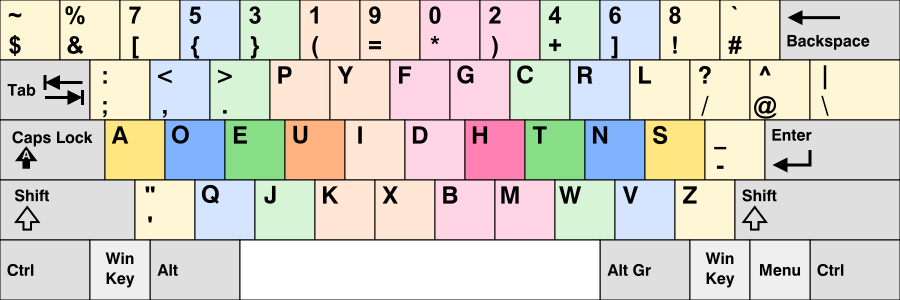
🔗 Wikipedia: Programmer Dvorak 🔗 Visualizer: Keymap Drawer
How to Switch Back
If you're not used to it and just want your usual QWERTY back, here’s how to fix it:
On NixOS
Edit your Home Manager config (usually nixos/modules/xserver.nix):
{
  services.xserver = {
    xkb.variant = "dvp"; # change this to "us" for QWERTY
  };
}
Qtile Layout Indicator
The bar uses a KeyboardLayout widget to toggle between layouts. Here's the relevant snippet from home-manager/modules/desktop/qtile/src/config.py (Line 405):
    widget.KeyboardLayout(
        fmt="{} ",
        foreground=colors["base09"],
        configured_keyboards=["us dvp", "ge", "us"],  # remove "us dvp" to avoid Dvorak
        display_map={
            "us dvp": "DVP",
            "ge": "GE",
            "us": "US"
        },
        option="caps:escape",
        **powerline("back_slash"),
    ),
Use Super + Space to toggle layouts at runtime.
Default is DVP, but you can remove it from configured_keyboards if you want.
Heads-up
- Caps Lock is Escape via
option="caps:escape"— change it if you want. - Both QWERTY and DVP layouts coexist for easy toggling and compatibility.
Why I Use It
- Faster coding ergonomics
- Less finger strain & fatigue
- Improved workflow efficiency
Perfectly integrated into my workflow, especially with modal editors like Neovim.
Changing It System-Wide (NixOS example)
Want to ditch DVP for good?
{
  services.xserver = {
    layout = "us";
    xkbVariant = ""; # empty string means default
  };
}
TL;DR
| Layout Seen | Reaction | What to Do |
|---|---|---|
| Programmer's Dvorak | Confused | Run setxkbmap us |
| Want to keep it? | All good | Learn & enjoy |
Resources to Learn
This layout is active by default when setting up this repository.